16 min read
Database Backups for a Live Game: One Script, Two Deployment Models
Date: 2026-10-04
Tags: postgresql, backup, restore, s3, minio, kubernetes, docker, cronjob, reliability, devops
The Incident
It was a Tuesday afternoon and I was doing something I had done a hundred times
before: cleaning up stale rows in the cashout_requests table. A player's cashout
request had been rejected weeks ago and the row was just noise. I opened a SQL
console against production and ran a DELETE.
The WHERE clause was wrong.
Instead of deleting one expired cashout request, I deleted every cashout
request. In a game where a player's credits are frozen — player_profiles.frozen_until
is set — while a cashout is being reviewed, that meant every in-flight payout lost
its backing record. The topup_transactions still existed, the players were still
frozen, but the cashout_requests row that tied a player's credits to a pending
payout was gone. The next scheduled reconciliation job would have seen a pile of
frozen players with no cashout request and either double-credited or silently
dropped them.
I noticed within about ninety seconds — the row count in the console was
absurdly high. My hands were shaking. I had no undo. There is no Ctrl+Z for a
DELETE.
What saved me was a pg_dump that had run automatically at 02:00 that morning
and been pushed to an S3-compatible object store. I pulled the dump, restored it
into a scratch database, extracted the cashout_requests rows I had destroyed, and
re-inserted them into production. Total data loss: zero. Total downtime: none.
The only thing that was actually broken was my confidence.
That incident is why this post exists. The backup system was already in place when I made the mistake — I just hadn't thought about it much until I needed it. This is the story of how it's built, and why it's built the way it is.
The Problem
Jambo is a real-time multiplayer card game with a money-adjacent layer: players top up credits, request cashouts, and have their credits frozen while those cashouts are reviewed. The PostgreSQL database is the single source of truth for all of it. The tables that matter most are exactly the ones you cannot afford to lose:
| Table | What it holds | Cost of loss |
|---|---|---|
users |
Accounts, credentials, language | Total account loss |
cashout_requests |
Payout requests and their state | Financial reconciliation breaks |
topup_transactions |
Money in | Financial reconciliation breaks |
player_profiles |
Player state, incl. the frozen_until freeze |
Orphaned freezes, stuck accounts |
games / game_cards |
In-flight and historical games | Game integrity, disputes |
A backup strategy for this database has to satisfy a few non-negotiables:
- Off-site. A dump sitting on the same host as Postgres is not a backup; it dies with the host.
- Automated. The one thing I learned from the incident is that a backup you have to remember to run is a backup that doesn't exist.
- Restorable. A backup you have never restored is a hypothesis, not a backup.
- Boring. It should run every day, succeed quietly, and never be something I think about — until the day I desperately need it.
Design Goals
Rather than reach for a heavyweight backup framework, I optimized for a small number of properties that matter for a project this size:
- One script, environment-agnostic. The same backup logic must run whether the stack is deployed on Kubernetes or via Docker Compose / Coolify. No forked logic, no "the K8s version does X but the Compose version does Y".
- Driven entirely by environment variables. Every knob — connection string, S3 endpoint, bucket, prefix, retention — is an env var with a sensible default. The script has no config file and no hard-coded environment.
- S3-compatible, not AWS-specific. The target is any S3-compatible store:
AWS S3, MinIO, Cloudflare R2, Backblaze B2, RustFS. The
mc(MinIO client) speaks all of them. - Retention built in. Old dumps are pruned automatically so the bucket doesn't grow forever.
- Fail fast and loud. Missing tools, missing credentials, a failed dump, a
failed upload — each exits with a distinct code so the failure is obvious in
docker logsorkubectl describe job.
Architecture Overview
The whole system is one shell script and two thin schedulers around it.
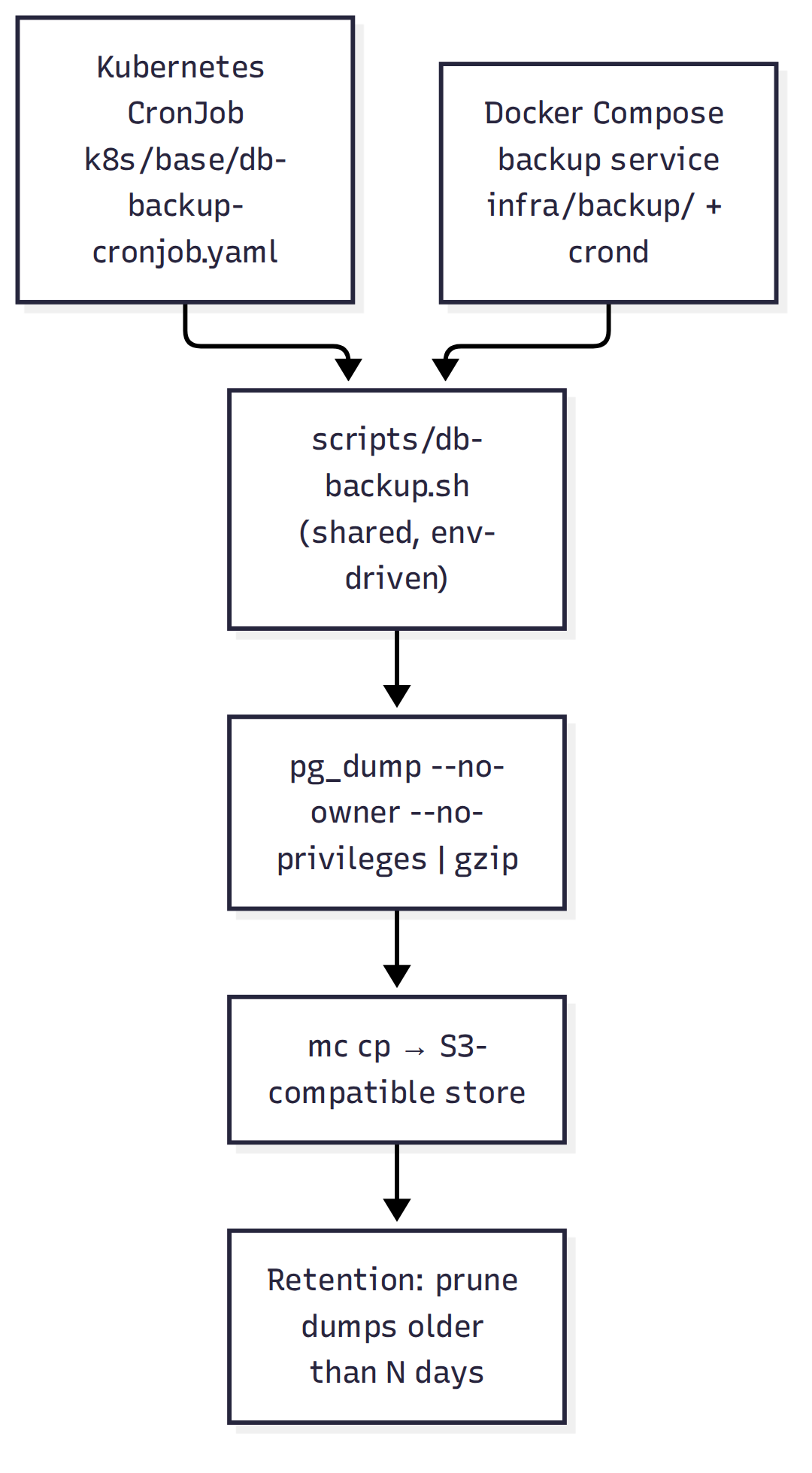
The key decision is that the script is the product. The Kubernetes CronJob and the Compose service are just two different ways to invoke it on a schedule. Everything that actually matters — connecting, dumping, compressing, uploading, pruning — lives in one file that both deployment models share.
The Shared Script
The heart of the system is scripts/db-backup.sh.
It is a single Bash script with set -euo pipefail at the top, and it is
deliberately boring. Let's walk through it.
Configuration
Every setting is an environment variable with a default, so the script runs unmodified in any environment:
# Database connection. Either DATABASE_URL (postgres://user:pass@host:5432/db)
# or the individual PG* variables. DATABASE_URL wins if both are set.
DATABASE_URL="${DATABASE_URL:-}"
PGHOST="${PGHOST:-localhost}"
PGPORT="${PGPORT:-5432}"
PGUSER="${PGUSER:-postgres}"
PGPASSWORD="${PGPASSWORD:-postgres}"
PGDATABASE="${PGDATABASE:-jambo}"

# S3-compatible object store.
S3_ENDPOINT="${S3_ENDPOINT:-https://s3.amazonaws.com}"
S3_BUCKET="${S3_BUCKET:-jambo-backups}"
S3_PREFIX="${S3_PREFIX:-jambo/}"
S3_ACCESS_KEY="${S3_ACCESS_KEY:-}"
S3_SECRET_KEY="${S3_SECRET_KEY:-}"
S3_REGION="${S3_REGION:-us-east-1}"
S3_INSECURE="${S3_INSECURE:-false}"

# Backup behaviour.
BACKUP_RETENTION_DAYS="${BACKUP_RETENTION_DAYS:-14}"
BACKUP_FILENAME_PREFIX="${BACKUP_FILENAME_PREFIX:-jambo}"
BACKUP_TMPDIR="${BACKUP_TMPDIR:-/tmp}"
The connection is built from either DATABASE_URL or the standard PG*
variables, with DATABASE_URL taking precedence:
build_pg_args() {
  if [ -n "$DATABASE_URL" ]; then
    printf '%s' "$DATABASE_URL"
  else
    printf 'postgres://%s:%s@%s:%s/%s' \
      "$PGUSER" "$PGPASSWORD" "$PGHOST" "$PGPORT" "$PGDATABASE"
  fi
}
One small but important detail: a non-empty S3_PREFIX is normalized to end
with a trailing slash, so object keys and the retention listing stay consistent:
Pre-flight checks
Before doing anything destructive or expensive, the script verifies its dependencies and credentials. Missing tools and missing credentials are the two failure modes that would otherwise produce a confusing downstream error:
for tool in pg_dump gzip mc; do
  if ! command -v "$tool" >/dev/null 2>&1; then
    err "required tool '$tool' not found in PATH"
    exit 1
  fi
done

if [ -z "$S3_ACCESS_KEY" ] || [ -z "$S3_SECRET_KEY" ]; then
  err "S3_ACCESS_KEY and S3_SECRET_KEY must be set"
  exit 1
fi
This is why the job fails fast with a clear message instead of uploading an empty or partial dump.
Dump and compress
The dump is a streaming pipeline: pg_dump writes to stdout, gzip compresses
it, and the result lands in a timestamped file. The timestamp is UTC so filenames
sort correctly regardless of where the container runs:
STAMP="$(date -u +%Y%m%d-%H%M%S)"
DUMP_FILE="${BACKUP_TMPDIR}/${BACKUP_FILENAME_PREFIX}-${STAMP}.sql.gz"
OBJECT_KEY="${S3_PREFIX}${BACKUP_FILENAME_PREFIX}-${STAMP}.sql.gz"

cleanup() {
  rm -f "$DUMP_FILE"
}
trap cleanup EXIT

log "Dumping database to $DUMP_FILE"
if ! pg_dump "$CONN_ARGS" --no-owner --no-privileges | gzip > "$DUMP_FILE"; then
  err "pg_dump failed"
  exit 2
fi
Two flags on pg_dump deserve attention:
--no-ownerstrips ownership assignments, so the dump can be restored by a different database user.--no-privilegesstripsGRANT/REVOKEstatements, so the dump doesn't depend on roles that may not exist in the target environment.
Together they make the dump portable across environments — the same file can be restored into a local dev database, a staging cluster, or production.
The trap cleanup EXIT guarantees the temporary dump file is removed on every
exit path, including failures, so the container's /tmp never accumulates
partial dumps.
Upload
The upload uses mc cp against a configured alias. The bucket is created
idempotently first, so a fresh environment works without manual setup:
mc alias set "${MC_OPTS[@]}" "$MC_ALIAS" "$S3_ENDPOINT" "$S3_ACCESS_KEY" "$S3_SECRET_KEY" \
  --api "s3v4" >/dev/null

if ! mc mb --ignore-existing "${MC_OPTS[@]}" "$MC_ALIAS/$S3_BUCKET" >/dev/null; then
  err "could not ensure bucket '$S3_BUCKET' exists (upload may still fail)"
fi

if ! mc cp "${MC_OPTS[@]}" "$DUMP_FILE" "$MC_ALIAS/$S3_BUCKET/$OBJECT_KEY" >/dev/null; then
  err "S3 upload failed for $OBJECT_KEY"
  exit 3
fi
The --api "s3v4" flag pins the signature version, which is what most
S3-compatible stores expect. S3_INSECURE=true adds --insecure to skip TLS
verification for self-signed MinIO deployments.
Exit codes
The script uses distinct exit codes so a failure is self-describing in the logs:
| Code | Meaning |
|---|---|
0 |
Success |
1 |
A required tool or credential is missing |
2 |
Database dump failed |
3 |
S3 upload failed |
4 |
Retention cleanup failed |
When a Kubernetes Job fails, kubectl describe job shows the exit code, and
docker logs shows the [db-backup] ERROR: line. Either way, the failure tells
you which stage broke without digging.
Deployment Model A: Kubernetes CronJob
In Kubernetes the script runs as a CronJob
(k8s/base/db-backup-cronjob.yaml).
The script itself is stored in a ConfigMap
(k8s/base/db-backup-script.yaml)
and mounted into the job pod, so the backup logic is versioned alongside the
manifests and applied by kustomize like everything else.
apiVersion: batch/v1
kind: CronJob
metadata:
  name: db-backup
  namespace: jambo
spec:
  schedule: "0 2 * * *"
  concurrencyPolicy: Forbid
  successfulJobsHistoryLimit: 3
  failedJobsHistoryLimit: 3
  jobTemplate:
    spec:
      backoffLimit: 3
      activeDeadlineSeconds: 1800
      template:
        spec:
          restartPolicy: OnFailure
          containers:
            - name: db-backup
              image: postgres:16-alpine
              command:
                - /bin/sh
                - -ec
                - |
                  apk add --no-cache curl >/dev/null 2>&1
                  curl -fsSLo /usr/local/bin/mc \
                    https://github.com/minio/mc/releases/download/RELEASE.2025-08-13T08-35-41Z/mc.linux-amd64.RELEASE.2025-08-13T08-35-41Z
                  chmod +x /usr/local/bin/mc
                  exec /scripts/db-backup.sh
Several choices here are deliberate:
image: postgres:16-alpine— the same image family as the database, sopg_dump's version matches the server. A mismatchedpg_dumpis a classic source of subtle restore failures.concurrencyPolicy: Forbid— if a backup is still running when the next schedule fires, the new run is skipped rather than running two dumps at once.activeDeadlineSeconds: 1800— a hard 30-minute ceiling, so a hung dump can't run forever.backoffLimit: 3— transient network failures get a few retries.restartPolicy: OnFailure— the pod restarts on failure, which combined with the backoff limit gives bounded retries.
Credentials come from the jambo-secrets Secret via envFrom, with the S3_*
keys pinned explicitly. The database URL comes from the jambo-config ConfigMap.
To run a backup immediately, outside the schedule:
That command is worth memorizing. It's the one you reach for when you're about to do something risky and want a fresh dump first.
Deployment Model B: Docker Compose / Coolify
For the Docker Compose and Coolify deployments, there is no cluster scheduler to
lean on, so the backup runs as a long-lived container with its own cron daemon.
The image is built from
infra/backup/Dockerfile:
FROM postgres:16-alpine

ARG MC_VERSION=RELEASE.2025-08-13T08-35-41Z
RUN apk add --no-cache curl \
    && curl -fsSLo /usr/local/bin/mc \
        "https://github.com/minio/mc/releases/download/${MC_VERSION}/mc.linux-amd64.${MC_VERSION}" \
    && chmod +x /usr/local/bin/mc \
    && mc --version

COPY scripts/db-backup.sh /usr/local/bin/db-backup.sh
COPY infra/backup/entrypoint.sh /usr/local/bin/backup-entrypoint.sh

RUN chmod +x /usr/local/bin/db-backup.sh /usr/local/bin/backup-entrypoint.sh

ENV BACKUP_CRON_SCHEDULE="0 2 * * *"

ENTRYPOINT ["/usr/local/bin/backup-entrypoint.sh"]
The entrypoint
(infra/backup/entrypoint.sh) installs a
cron entry and then runs crond in the foreground so the container stays alive:
BACKUP_CRON_SCHEDULE="${BACKUP_CRON_SCHEDULE:-0 2 * * *}"

echo "${BACKUP_CRON_SCHEDULE} /usr/local/bin/db-backup.sh >> /proc/1/fd/1 2>&1" \
  > /etc/crontabs/root

exec crond -f -l 8
The >> /proc/1/fd/1 2>&1 redirect is the trick that makes cron output visible:
cron normally swallows stdout, but writing to PID 1's file descriptor routes the
backup logs into the container's stdout, where docker logs and Coolify's log
viewer can see them.
The Compose service itself is defined in
infra/docker-compose.yml and
infra/docker-compose.coolify.yml:
backup:
  build:
    context: ..
    dockerfile: infra/backup/Dockerfile
  depends_on:
    postgres:
      condition: service_healthy
  environment:
    DATABASE_URL: postgres://postgres:postgres@postgres:5432/jambo
    S3_ENDPOINT: ${S3_ENDPOINT:-https://s3.amazonaws.com}
    S3_BUCKET: ${S3_BUCKET:-jambo-backups}
    S3_PREFIX: ${S3_PREFIX:-jambo/}
    S3_ACCESS_KEY: ${S3_ACCESS_KEY:-}
    S3_SECRET_KEY: ${S3_SECRET_KEY:-}
    BACKUP_RETENTION_DAYS: ${BACKUP_RETENTION_DAYS:-14}
    BACKUP_CRON_SCHEDULE: ${BACKUP_CRON_SCHEDULE:-0 2 * * *}
  restart: unless-stopped
  security_opt:
    - "no-new-privileges:true"
  cap_drop:
    - ALL
The depends_on: postgres: condition: service_healthy ensures the backup
container doesn't start its cron daemon until Postgres is actually accepting
connections. The no-new-privileges and cap_drop: ALL hardening means the
backup container runs with the minimum privileges it needs.
Retention Without a Database
The trickiest part of the script is retention, because there is no database tracking which backups exist — the object store is the index. The script lists objects under the prefix as JSON and deletes anything older than the cutoff:
CUTOFF_EPOCH="$(( $(date +%s) - BACKUP_RETENTION_DAYS * 86400 ))"
CUTOFF_DATE="$(date -u -d "@${CUTOFF_EPOCH}" +%Y%m%d)"

while IFS= read -r line; do
  [ -z "$line" ] && continue
  key="$(printf '%s' "$line" | sed -n 's/.*"key":"\([^"]*\)".*/\1/p')"
  lm="$(printf '%s' "$line" | sed -n 's/.*"lastModified":"\([^"]*\)".*/\1/p')"
  if [ -z "$key" ] || [ -z "$lm" ]; then
    continue
  fi
  obj_date="$(printf '%s' "$lm" | cut -c1-10 | tr -d '-')"
  if [ "$obj_date" -lt "$CUTOFF_DATE" ]; then
    log "Deleting old backup: $key"
    if ! mc rm "${MC_OPTS[@]}" "$MC_ALIAS/$S3_BUCKET/$S3_PREFIX$key" >/dev/null; then
      err "failed to delete $key"
      exit 4
    fi
  fi
done < <(mc ls --json "${MC_OPTS[@]}" "$MC_ALIAS/$S3_BUCKET/$S3_PREFIX" 2>/dev/null || true)
There are two portability landmines here, both of which shaped the code:
-
mc ls --jsoninstead of table output. The human-readablemc lstable has a column layout that can shift between versions. The JSON output is machine-readable and stable, so the script parses"key"and"lastModified"withsedrather than relying on column positions. -
Date-only comparison instead of timestamp comparison. The container runs on Alpine, whose busybox
datecannot parse the timezone-suffixed timestamps thatmc lsprints. So the script reduces both sides to aYYYYMMDDinteger and compares those. It's less precise — a backup is pruned on its date, not its exact time — but it works identically on busybox and GNU coreutils.
The || true on the mc ls subshell is intentional: if the listing fails (for
example, the prefix is empty on a brand-new bucket), the loop simply processes
nothing rather than aborting the whole backup after a successful upload.
Restoring a Dump
This is the part that actually matters, and it's the part I exercised during the
incident. Dumps are plain pg_dump output compressed with gzip, so they restore
with standard tools from any machine with network access to the database.
# Download the dump from S3 (using mc) and decompress
mc cp myalias/backups/jambo-2026-08-26T020000.sql.gz /tmp/dump.sql.gz
gunzip -c /tmp/dump.sql.gz > /tmp/dump.sql

# Restore into the postgres pod / container
kubectl -n jambo exec -i deploy/postgres -- psql -U postgres -d jambo < /tmp/dump.sql
# or, for Docker Compose:
docker compose -f infra/docker-compose.yml exec -T postgres psql -U postgres -d jambo < /tmp/dump.sql
During the incident, I didn't restore the whole database — that would have
clobbered the ninety seconds of legitimate writes that happened after my
mistake. Instead I restored the dump into a scratch database, extracted only
the cashout_requests rows I had destroyed, and re-inserted those into production.
That's the surgical-restore pattern, and it only works because the dump is a
complete, self-contained snapshot:
# Restore the dump into a scratch database, not production
createdb -h localhost -U postgres jambo_scratch
gunzip -c /tmp/dump.sql.gz | psql -h localhost -U postgres -d jambo_scratch

# Extract just the rows you need and re-insert them
pg_dump -h localhost -U postgres -d jambo_scratch \
  --data-only --table=cashout_requests > /tmp/cashout_rows.sql
psql -h localhost -U postgres -d jambo < /tmp/cashout_rows.sql
Caveat: restoring a full dump into an existing database will overwrite conflicting rows. For a clean full restore, drop and recreate the database first. For a partial restore, always go through a scratch database so you don't clobber live data.
The --no-owner --no-privileges flags from the dump step are what make this
portable: the scratch database can be owned by a different user with a different
role set, and the restore still works.
Lessons Learned / Trade-offs
A few things I'd want a future me to know:
mc is fetched from GitHub, not dl.min.io. The old MinIO download URL was
deprecated and now returns HTTP 410. Both the Dockerfile and the CronJob fetch
the mc binary from the official GitHub release instead. The version is pinned
via MC_VERSION / an explicit URL, so upgrades are deliberate rather than
accidental.
busybox date is not GNU date. The retention logic deliberately avoids
date -d with timezone-suffixed input because Alpine's busybox date can't
parse it. Reducing to a date-only integer comparison is the portable answer.
Out-of-cluster object stores need a routable address. The backup container
runs on its own Docker network and can't resolve another container by name. For
a store like RustFS running outside the compose network, point S3_ENDPOINT at
the host-published address (http://host.docker.internal:9000 on Docker Desktop,
or http://<docker-host-ip>:9000 on plain Linux / Coolify).
--no-owner --no-privileges is a portability decision, not a security one.
It makes dumps restorable anywhere, at the cost of not preserving role
assignments. For this project that's the right trade — the roles are managed by
migrations, not by the dump.
A backup you haven't restored is a hypothesis. The incident taught me this the hard way. The dump existed, but I had never actually restored one until the day I needed to. Now the restore path is documented and exercised. If you take one thing from this post: run a restore drill. Restore last night's dump into a scratch database and confirm it works. The worst time to discover your backup is broken is during an incident.
Retention is a safety net, not a cost optimization. Fourteen days of daily dumps is cheap. The retention window exists so that if a corruption goes unnoticed for a few days, you still have a clean dump from before it started. Don't set it so short that you prune the last known-good backup.
Wrapping Up
The backup system is one shell script, two thin schedulers, and a handful of environment variables. It dumps the database daily, compresses it, uploads it to an S3-compatible store, and prunes old copies — identically on Kubernetes and on Docker Compose. It fails fast and loud when something is wrong, and it produces portable dumps that can be restored anywhere.
It is not clever. That's the point. The night I deleted the cashout_requests
rows, I didn't need clever — I needed a boring pg_dump from that morning and
the knowledge of how to restore it. Everything in this post exists to make sure
that dump is there, and that I know how to use it.